Free
0
1 page without an account, then 3 pages every month with a free account.
Start convertingPhotograph a page or upload a PDF. We read the notes and give you MusicXML, MIDI and a clean PDF, ready for MuseScore, Sibelius or any notation app.
The first bars of Bach's Minuet in G: the page as a phone sees it, and the score you get back, ready to play, edit or print. (Illustration.)
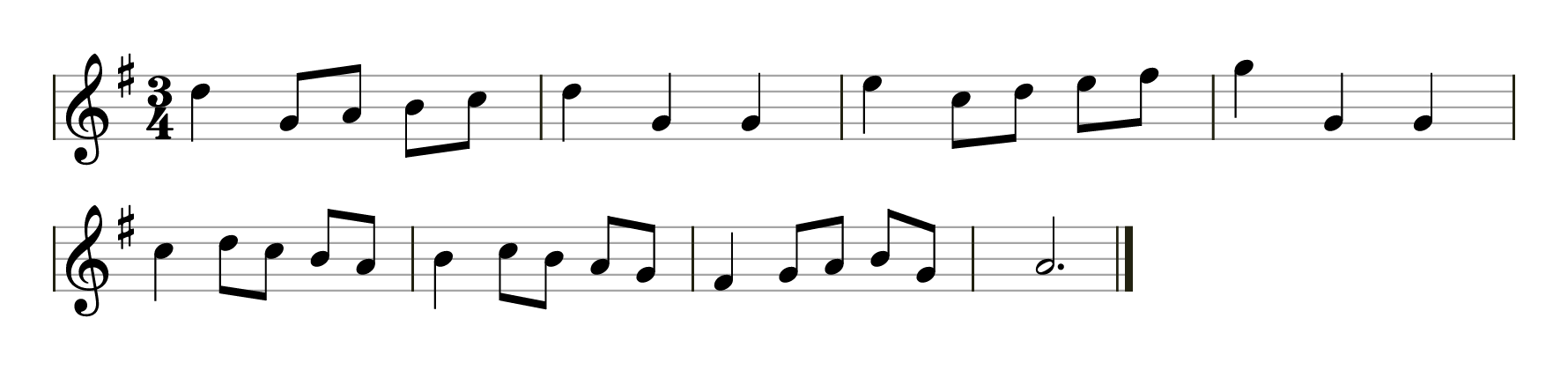
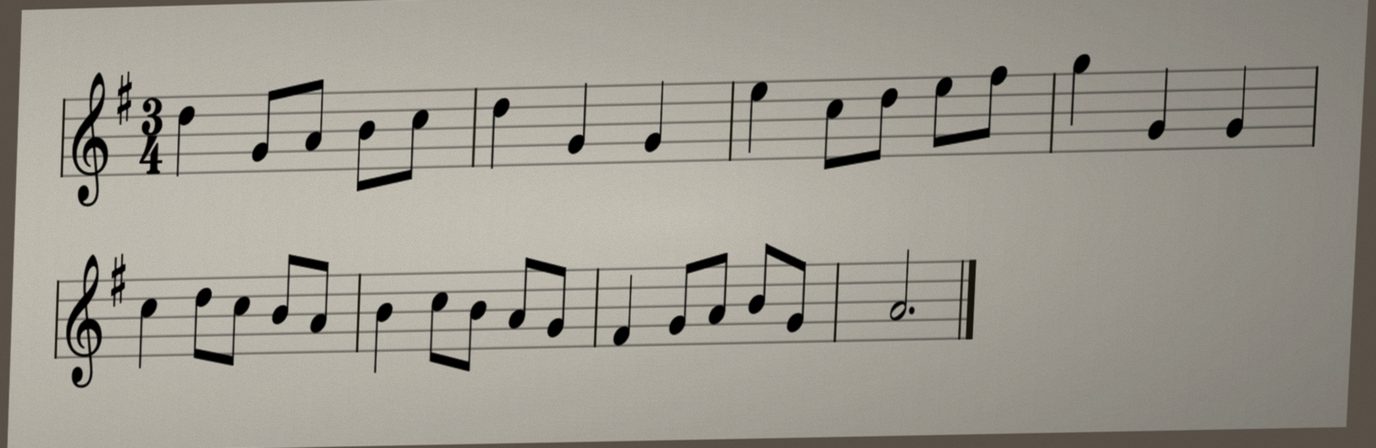 Your photoYour score
Three steps, in the browser on your phone or computer. Nothing to install.
Photograph a page with your phone, or drop a scanned PDF, a JPG or PNG image, or a MIDI file. A PDF can have up to 10 pages; you can also paste an image or a link to a file.
Optical music recognition (OMR) finds the staves, clefs, key and time signatures, notes, rests and their rhythms, and rebuilds the piece as a real score, bar by bar.
Listen to the result, compare it with your page, and download MusicXML for MuseScore, Sibelius, Finale or Dorico, a clean PDF to print, or MIDI for your DAW.
One upload gives you every format, so you can edit, print or play the music wherever you work.
Turn a PDF score into an editable file instead of copying it note by note into your notation program.
Snap a page from a book or a handout at rehearsal and get a digital score you can transpose and reprint.
Hear how a piece sounds before you learn it, or bring the notes into a DAW as a starting point for an arrangement.
Turn a MIDI file into readable notation with bars, clefs and key signature, and print it as a PDF.
Open the MusicXML in your notation program and move the piece to another key for a singer, clarinet or horn.
Scan out-of-print books, choir folders and teaching material into files that won't fade or get lost.
No scanner needed: a clear photo from your phone camera is enough.
Every result plays back in the page, so you can catch a wrong note before it ends up in your score.
MusicXML, PDF and MIDI from the same upload. You don't pay again for another format.
Your files are only yours. We don't share them, publish them or use them to train models, and uploads are deleted after 7 days.
Convert your first page free, without signing up. With an account you get free pages every month.
Need more? Buy a page pack once. No subscription, and bought pages never expire.
Start free. Need more? Buy pages once: no subscription, and bought pages never expire.
0
1 page without an account, then 3 pages every month with a free account.
Start converting
One payment. Use them whenever you like, on any device.
Buy 20 pages
One payment. Use them whenever you like, on any device.
Buy 60 pages
One payment. Use them whenever you like, on any device.
Buy 150 pagesPrices include VAT where it applies and are shown in your currency. A page with more than 50 bars counts as more than one. Unused pages can be refunded within 14 days.
Upload a photo or a PDF of the score at the top of this page. When the conversion is done, choose MusicXML under Download and open the file in MuseScore, Sibelius, Finale, Dorico or any program that reads MusicXML.
Yes. Upload the PDF and choose MIDI when it's done. The notes are read with optical music recognition, so it works with scanned PDFs as well as PDFs exported from notation software.
Yes. Open papertoscore.com on your phone and tap Take a photo. Shoot the page from straight above in good light, with the whole page in the frame and one piece per photo.
Clean printed music converts very well. Small print, dense piano scores, low-resolution photos and unusual notation produce more mistakes, so play the result back and check important passages against the original. Handwritten music isn't supported yet.
Printed scores: melodies, lead sheets, songs, solo pieces, studies and parts for one instrument, and piano music. Guitar tablature, lyrics and chord symbols are not read yet.
Your first page is free without an account, and an account gets free pages every month. For more, page packs are a one-time purchase with no subscription. A long page with more than 50 bars counts as more than one page.
MusicXML is the standard exchange format for notation: MuseScore (free), Sibelius, Finale, Dorico, Notion, Noteflight, Flat, Guitar Pro and many more read it.
They are stored privately for you only and are never shared or used for training. Uploaded originals are deleted after 7 days; see the privacy policy for details.
Free, in your browser, no account needed.
Upload sheet music